
Acumatica 2025 R2 doubles down on a critical frontier — making AI both usable and trustworthy for mid-market businesses. Rather than treating AI as an add-on, Acumatica embeds assistive intelligence into its modern UI, enabling automation anywhere without added complexity.
In this exclusive ERP News Q&A, Jeremy Larsen, VP of Product Management at Acumatica, shares how the company’s AI-first, human-controlled philosophy empowers users to automate safely, evolve at their own pace, and stay compliant. From AI Studio’s open architecture to Project 360 and Order Orchestration, he explains why 2025 R2 marks a decisive step toward autonomous ERP done right.

Strategy & Positioning
What’s the single most non-obvious problem 2025 R2 solves for mid-market teams that previous versions (or competitors) did not?
The 2025 R2 release solves a core challenge facing many mid-market companies —how to make AI more accessible, meaningful, and truly usable in day-to-day workflows. Acumatica 2025 R2 does this by embedding assistive AI directly into our new, modern, and easy-to-use UI, allowing users to apply automation anywhere in the system, regardless of the product feature in use. This seamless integration into everyday practices makes automation accessible to every user, not just IT or data teams. Its “AI-first” capabilities empower businesses with the power of AI, making their ERP solution future-ready without added complexity or cost.
Where does Acumatica draw the line between “assistive AI” and “autonomous actions” in ERP? What’s the roadmap to move that line?
Acumatica’s focus is on delivering automation with control. AI serves as an assistant, helping users complete tasks, make decisions, and automate workflows, while ensuring humans remain in control. As customers become more comfortable, they can decide how much autonomy to grant AI tools. Over time, as trust and confidence grow, they can reduce oversight and shift toward more autonomous operations. Acumatica’s roadmap enables this gradual evolution as future releases will allow customers to delegate more tasks to AI while maintaining complete visibility, approval checkpoints, and rollback safeguards across all critical processes.

AI Studio & model governance
Which model(s) power AI Studio in production today (foundation, fine-tuned, or ensemble), and how do you handle model selection per task?
In the 2025 R2 release, AI Studio doesn’t rely on prebuilt models. Rather, it serves as a proxy that enables users to connect to their own deployments of foundation LLM in OpenAI, Anthropic, AWS, and Azure.
How do you mitigate hallucinations in financial and inventory scenarios? Please walk us through guardrails, human-in-the-loop, and rollback.
Because there are no pre-built models in AI Studio and it connects to customer-selected LLMs, Acumatica provides structural safeguards rather than dictating model behavior. Guardrails include role-based access, human-in-the-loop approval steps, and complete rollback options for any AI-assisted updates. The quality of AI-generated results depends on the underlying model and prompting strategy chosen by the customer; however, Acumatica’s framework ensures that all outputs remain reviewable, auditable, and reversible, keeping automation powerful while maintaining accountability – with the user always in control.
Can customers bring their own models or private endpoints? Any constraints around latency, cost, or data residency?
Yes, customers can bring their own large language model deployments from leading providers such as OpenAI, Anthropic, AWS, or Azure. Acumatica’s AI Studio is designed as an open connector, so customers maintain complete flexibility and control over their model selection and private endpoints.
Data, privacy, and compliance
What data leaves the tenant boundary for AI inference/training, if any? How is PII handled, and what audit artifacts can customers export?
In AI Studio, only the text or values the user includes in prompt instructions are sent externally for inference. This content is fully visible on the LLM prompt screen before submission. Starting in 2026, data masking will automatically anonymize sensitive inputs, replacing values with masked tokens that revert to their original form once a response is received. For Anomaly Detection, only numeric data/target values with hashed identifiers are transmitted, making the data effectively anonymous.
For AP Document and Receipt Recognition, files are processed securely through Acumatica’s managed Azure Form Recognizer or AWS accounts, depending on the feature. The Intelligent Text Completion feature executes entirely within the customer’s Acumatica instance, ensuring no data leaves the environment.
For customers in the EU/Mexico/Canada, how do you enforce regional processing (SCCs, SOC 2, ISO 27001, FedRAMP/StateRAMP equivalents if relevant)?
One of Acumatica’s key priorities is to ensure all regional deployments align with data residency and compliance frameworks applicable to each geography. Data remains within regional boundaries, and no customer data used for inference or processing is stored outside the tenant’s designated region. Acumatica offers a broad range of licensing options, providing customers with choices on how they want to deploy and meet local requirements for their countries or regions. We also offer private cloud options for customers in remote areas with specific compliance requirements.
Measurable outcomes
You mention anomaly detection and automation wins—what are 3 hard KPIs (with baselines) early adopters achieved within 90 days?
While specific KPI baselines vary by customer, early adopters of Acumatica’s anomaly detection and automation capabilities have reported measurable improvements in efficiency and financial performance within the first 90 days. For example, some have experienced faster collection cycles and reduced receivables, while others have achieved improved process accuracy and time savings in manual reviews. Because Acumatica’s AI adapts to each customer’s unique workflows, success metrics differ, allowing organizations to define and track the outcomes most meaningful to their business.
For AP automation and vendor payments, what was the biggest unexpected failure mode you fixed during beta?
During beta testing, we discovered some performance issues with private cloud (non-SaaS) customers. While AP automation and vendor payments were initially made available to them, the team found that certain technical and performance requirements couldn’t be consistently met. As a result, the product was refined and limited to SaaS customers to ensure reliability, scalability, and consistent user experiences.
Industry editions (construction / distribution / manufacturing)
Construction: Project 360—what real-time sources feed it, and how do you prevent stale or conflicting signals (RFIs, change orders, field data)?
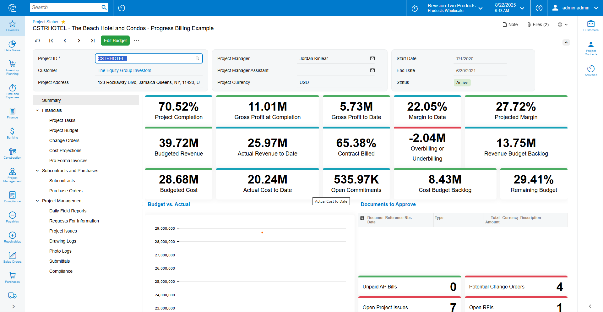
Project 360 is built on new technology that embeds interactive dashboards directly within data entry screens, providing users with real-time visibility without requiring them to switch contexts. It draws from data sources specifically designed to extend financial data collection and enhance analytical insight with date-sensitive information. By enabling instant data sharing between the field and the office, Project 360 eliminates lag and prevents stale or conflicting information from disrupting project decisions.
Distribution: Order Orchestration—how do you optimize across cost, SLAs, and inventory risk simultaneously? Any explainability for the warehouse choice? How do you optimize across cost, SLAs, and inventory risk simultaneously? Any explainability for the warehouse choice?
Order Orchestration helps control costs, maximize service levels, and reduce inventory risk by allowing businesses to define fulfillment strategies that guide the automatic assignment of sales orders to warehouses. Users can configure orchestration plans to prioritize warehouses based on geographic proximity (Destination Priority) or a manually ranked list of preferred warehouses (Warehouse Priority). These strategies allow businesses to align fulfillment decisions with their operational goals.
To help control costs, users can limit the number of warehouses used to fulfill a single order, reducing the likelihood of split shipments and associated freight expenses. While Acumatica does not calculate shipping or handling costs directly, businesses can set warehouse priorities based on their own cost considerations.
To maximize service levels, the Destination Priority strategy selects warehouses based on the customer’s shipping zone, helping reduce delivery times and support SLA commitments.
To reduce inventory risk, orchestration plans can enforce safety stock thresholds. Warehouses are excluded from fulfillment if fulfilling an order would result in violating the minimum inventory levels defined for that item. The system selects the best warehouse(s) based on the chosen fulfillment strategy and the rules outlined in the orchestration plan. These rules include warehouse rankings, shipping zones, safety stock settings, and optional limits on the number of warehouses per order. Once orchestration is triggered, the system automatically assigns the recommended warehouse(s) to each order line, streamlining fulfillment while respecting the configured constraints.
Manufacturing: New scheduling + lot/serial traceability—what’s improved for recall readiness (speed to isolate, evidence trails, CFR 21 Part 11)?
The new scheduling and lot/serial traceability features enable faster and more targeted recalls. Lot tracking allows manufacturers to quickly isolate affected batches rather than recalling entire product lines, while serial tracking pinpoints individual defective units, turning broad recalls into precise interventions. Attributes such as production origin, inspection level, and expiration date enable manufacturers to meet stringent compliance regulations. Systems that track these attributes ensure automated documentation, reducing the risk of fines or shutdowns due to missing or inaccurate records. Compliance-driven traceability also supports faster audit responses, minimizing downtime and legal exposure.
Lot and serial attributes make it possible to trace defects back to specific suppliers, production lines, or material sources, enabling rapid root cause identification and corrective action before issues escalate. Tracking expiration dates and inspection levels enhances stock rotation, reducing spoilage and obsolete inventory. Real-time visibility into lot and serial attributes helps prevent overstocking or understocking, thereby improving operational efficiency. These capabilities ultimately strengthen customer trust and service, ensuring products meet specific quality and compliance requirements and allowing businesses to respond transparently and effectively in the event of an issue—preserving both brand reputation and loyalty.
Extensibility & upgrades
The modern UI enables deep personalization. How do you ensure upgrade-safe customizations and prevent “UX drift” across units and partners?
The new modern UI now available to all users in 2025 R2 is built on upgrade-safe design principles using our proprietary technology. All customizations are preserved by automating classic form migration to the Modern UI, rather than making direct code changes. This ensures upgrades don’t overwrite customer or partner adaptations. We also enforce a consistent design system and UI schema, preventing UX drift across different deployments.
- What’s the migration path from earlier releases—any tools to auto-refactor screens/fields/tabs? Typical effort for a mid-market org?
We’ve taken the steps to make sure that migration to the modern UI is customizable, flexible and gradual. Existing customers can move at their own pace—by module, user group, or workflow—without a complete overhaul. Acumatica provides migration tools to help refactor legacy customizations, screens, and fields, which have been available to partners well in advance of the release. For a typical mid-market organization, the transition effort is moderate and can be completed incrementally with minimal disruption.
Ecosystem & TCO
How does 2025 R2 change ISV economics in the Marketplace (APIs, events, revenue share)?
Our latest product release provides the highest value for our ISVs in the Marketplace. ISVs can now accelerate their roadmaps by bringing more products to the marketplace using the new modern UI and API-enabled AI features. We expand opportunities for ISVs by delivering a more modular and event-driven architecture that simplifies the integration and scaling of third-party applications within the platform. New APIs enable real-time data and more efficient automation across workflows. These improvements ultimately expand the addressable market and accelerate time-to-value for ISV partners.
What’s your candid TCO story vs. NetSuite, Microsoft, and Sage Intacct for a 100–200 employee firm with light manufacturing?
Acumatica delivers a lower total cost of ownership for growing mid-market companies thanks to its modern, scalable architecture and unique consumption-based licensing model, which scales with the business without steep cost increases. Acumatica customers benefit from being “always current,” minimizing upgrade and maintenance expenses. Combined with the Acumatica Customer Bill of Rights, firms can count on predictable costs and long-term savings as their operations expand.
Proof & edge cases
Please share two customer stories—one smooth, one messy. What broke, how did you fix it, and what did you change in the product?
Since we just released 2025 R2, there aren’t customer stories at that level of detail yet. However, Acumatica proactively validates each release through programs, labs, and customer testing to ensure smooth adoption and minimize issues before general availability.
If a customer disables AI features entirely, what percent of the 2025 R2 value remains (UI, orchestration, reporting)? Why?
If a customer disables AI features, they still retain nearly all the core value of 2025 R2. The only impact is on AI-driven automations; those processes simply revert to manual or traditional workflows. Customers can continue to analyze their data, process transactions, and use all other capabilities, including the modern UI, orchestration, and reporting – capabilities they already benefited from prior to the AI-driven enhancements to our comprehensive ERP solution. All features of 2025 R2 remain available; AI offers additional time-saving options. Acumatica’s approach is “human first”—AI enhances efficiency, but customers always have complete control over how they work.

Jeremy Larsen
VP of Product Management, Acumatica