
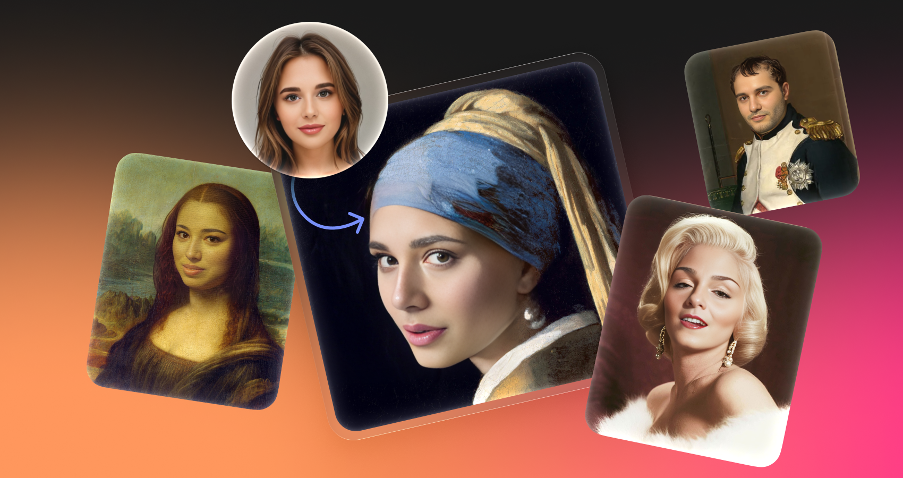
AI image manipulation discussions usually spiral into debates about deepfakes and misinformation. But for visual designers, content managers, and marketers, the technology serves a pragmatic function. It acts as a utility for asset recovery, localization, and privacy protection. The real challenge isn’t figuring out how to swap a face. The challenge is using tools like Face Swapper by Icons8 responsibly without crossing ethical lines or destroying image fidelity.
Face Swapper operates differently from the crude “cut and paste” methods of early meme generators. It doesn’t just overlay a static image. The AI analyzes both the source and target to generate a new facial structure. It blends the source identity with the target’s lighting, angle, and expression. That nuance makes it viable for commercial applications where the goal is visual consistency, not deception.
Scenario: Localizing Marketing Assets at Scale
Global marketing campaigns often hit a specific bottleneck: regionally appropriate imagery. A campaign shot in Berlin might feature models that don’t resonate with an audience in Tokyo or São Paulo. Reshooting the entire campaign is usually too expensive to consider.
Marketing directors can use Face Swapper to adapt existing high-quality assets instead. The team starts with a “master” image-a high-resolution shot of a model holding a product. Lighting, composition, and product placement are perfect. But the model’s demographic needs to shift for a specific regional ad buy.
Don’t waste time sourcing new stock photos that might clash with brand guidelines. Upload the master image to the tool. Select a target face from a library of AI-generated portraits or authorized model stock. Since Face Swapper handles resolutions up to 1024px, the output remains crisp enough for web banners and social ads. The tool maps the new facial features onto the original head pose.
The critical advantage here is preserving the original “vibe.” If the original model was laughing or looking sideways, the swapped face adopts that exact expression. The AI handles the heavy lifting of matching skin tones and smoothing the transition at the neck. You get a localized asset in minutes rather than weeks. Brands can speak authentically to different markets without blowing the photography budget.
Scenario: Protecting Privacy in UX Case Studies
User experience researchers frequently document real-world interactions. A researcher might photograph a user testing an app in a coffee shop or a patient interacting with a medical device. These images are gold for internal presentations. They show genuine body language and context. But using the subject’s actual face often violates privacy agreements or GDPR compliance.
Blurring faces is the traditional solution. It also ruins the aesthetic quality of a portfolio and dehumanizes the subject. Here, an ai face swap becomes a privacy tool rather than a novelty.
Researchers can upload sensitive field photos directly. Instead of swapping in a celebrity face-which is distracting and legally dubious-they use an AI-generated face that doesn’t belong to a real human. This renders the subject unrecognizable while keeping the human element intact. The viewer still sees a person looking at a screen with a specific emotional reaction like frustration or delight. But the participant’s actual identity is completely obfuscated.
Agencies can then publish robust case studies without seeking complex model releases. It answers the ethical question by using manipulation to protect identity rather than expose it.
A Tuesday Morning with Quinn: Fixing the Group Shot
To understand how this fits into the daily grind, look at Quinn, a social media manager for a mid-sized tech firm. It is 10:00 AM. The events team just sent over photos from last night’s launch party. They need a group photo posted by noon.
The best photo of the CEO and the dev team has a problem. Lighting is great. Composition is balanced. But the lead developer is mid-blink, and the marketing lead is making an unflattering expression while talking.
Quinn opens Face Swapper. This isn’t about changing identities; it is about correction. Quinn finds a different photo from the same burst where the developer’s eyes are open and crops that face.
- Upload: Quinn drags the “bad” group photo into the browser.
- Multiswap: The tool detects all faces in the group shot. Quinn selects the developer’s face specifically.
- Swap: Quinn uploads the “good” crop of the developer. The AI processes the swap, replacing the blinking face with the alert one, and adjusts the slight head tilt to match the target body.
- Refinement: For the marketing lead, Quinn doesn’t have a better shot. Instead, Quinn uploads the group photo again as the “source.” This triggers the “skin beautifier” effect. It smooths out skin texture and reduces harsh shadows caused by venue lighting without altering the person’s fundamental look.
By 10:15 AM, Quinn downloads the result. File size stays under the 5MB limit, and resolution is preserved. History is cleared to ensure no internal data lingers on the server. The photo goes live. Nobody notices the edit. That is the hallmark of a successful swap.
Comparing the Tool Landscape
The market for face manipulation is crowded. Options range from mobile novelties to high-end retouching suites.
Manual Compositing (Photoshop):
The traditional route. It offers total control but requires high skill. You have to manually match grain, lighting, skin tone, and perspective. A convincing head swap can take an hour of work. Best choice for print billboards, but overkill for a blog post.
Mobile Apps (Reface, FaceApp):
Built for virality, not utility. These apps usually compress images heavily, leaving you with a low-res file often stamped with a watermark. They prioritize extreme transformations (gender swaps, aging) over the subtle identity preservation needed for professional work.
Face Swapper by Icons8:
This tool sits in the middle. It runs in the browser, meaning no GPU costs or software installation. It supports batching-superior to mobile apps-and offers higher resolution output (1024px) than most automated competitors. You lose the pixel-level control of Photoshop but get 90% of the quality in 1% of the time.
Limitations and When This Tool Is Not The Best Choice
The AI is robust, but it is not magic. Users must navigate specific technical constraints.
Obstructions are Kryptonite:
Documentation notes that the AI struggles with partially covered faces. If a subject has a hand over their mouth, heavy bangs covering eyes, or a large face mask, the algorithm often produces artifacts. Practical experience shows that rimless glasses or complex headwear can sometimes confuse the blending process. This results in warped frames.
Profile Views:
The technology works by mapping facial landmarks. A full frontal view or a slight turn works perfectly. But a strict 90-degree side profile (3/4 head position) often lacks enough data points for a convincing swap. The result can look flattened or misaligned.
Print Resolution:
The 1024px output excels for digital use. But if you are designing a full-page magazine ad or a large poster, this resolution will likely be insufficient. You would need to run the output through a dedicated upscaler (like the integrated Smart Upscaler) to make it print-ready. That adds a step to the workflow.
Getting the Best Results
Input selection is everything. The AI tries to bridge the gap between source and target, but you can help it by minimizing that gap.
- Match the Lighting: If your target photo is dramatic and moody with strong shadows, don’t swap in a face flatly lit by fluorescent office lights. The AI will try to blend them, but the texture mismatch often looks artificial.
- Use High-Quality Sources: Output quality is capped by the lowest quality input. Use a blurry 20KB JPEG as the source face, and the result will look soft. Even if the target body is a 4K image.
- The “Same Face” Trick: Have a photo that is perfect except for grainy skin or minor blemishes? Upload the same photo as both the source and the target. The AI processing inherently smooths and reconstructs features. It acts as an automated retoucher that cleans up the complexion while keeping the identity exact.
- Secure Your Data: For sensitive projects, use the privacy controls. The system auto-deletes images after two months, but you should manually clear your history immediately after downloading assets. This ensures maximum data hygiene.